 Fabritorio
Qwen what do I eat?
Dogfooding to get food
If you are like me (and my partner), then there’s a good chance you often struggle to choose what to cook. Every grocery run becomes a “quick one”. Doing a real one once we’ve planned what to get more thoroughly. This is one of the things I’ve sort of automated with OpenClaw before.
I’ve kept a “recipe book” in Notion and it will choose and generate a meal plan based on the recipes, we’ll have a back and forth until I’m satisfied with what it chose, then it will generate a grocery list grouped according to each section.
The plan is to port this to Fabritorio.
Help me Claude
I already had tried making a Notion CLI with one of the pre-defined agents, the tool builder. However I think it was too much even for qwen3.6:27b and it keeps failing the exact shape of fetching Notion pages, grabbing every block (and subblocks) and leading to context OOM.
That meant reaching out for Claude Code so that I can iteratively build on the CLI without thinking of the overhead of doing it inside Fabritorio. We’ll get there eventually (hopefully). While at it I tried to make a generic skill so that I can effectively build run time tools with external harnesses.
The Fabritorio tool builder skill for any harness, if you want to yoink
---
name: fabritorio-tool-builder
description: Build or extend a Fabritorio runtime tool — a single CLI binary plus a manifest.json that the runtime discovers by scanning a tools directory — from any coding harness (Claude Code, pi, a shell, or by hand). Use this whenever someone wants to create, build, wrap, scaffold, or extend a CLI, tool, or integration for Fabritorio: e.g. "build a Linear CLI for Fabritorio", "wrap this REST API as a tool", "add a Notion tool", "turn this script into a runtime tool", "extend the existing X tool", or anything that involves writing a manifest.json for a Fabritorio tool — even when the phrase "Fabritorio runtime tool" isn't used explicitly. Covers the Go-default static binary, the bash_cli manifest contract, credential/env-var wiring, smoke-testing, and updating tools in place.
---

# fabritorio-tool-builder

Build a **Fabritorio runtime tool**: a CLI that any Fabritorio agent can wire as a `tool` node and call natively — gated by permissions, not routed through `bash`.

The key fact that makes this skill harness-neutral: **the integration boundary is files on disk, nothing else.** There is no SDK to call and no registration step. The runtime discovers a tool by scanning a directory for an executable binary next to a `manifest.json`. So whatever can write those two files — this agent, Claude Code, pi, a CI job, or you with an editor and `go build` — produces a first-class tool. The harness is interchangeable; the manifest is the contract.

**The manifest is the product, not the binary.** A binary with no manifest is invisible: the registry won't surface it, agents won't find it in the catalog, the `tool` node won't resolve. The Go code is the easy part — the judgment is in the manifest. Its full schema, field semantics, and a worked example live in **`references/manifest.md`**; read that file when you're about to write the manifest (step 5 below), not before.

## Where things live — the one Fabritorio-specific path

The runtime scans a **tool scan root** and projects each conforming manifest into the agent tool catalog. The root is:

- `~/.fabritorio/tools/` by default, **or**
- the first colon-separated entry of `$FABRITORIO_TOOL_ROOTS`, if set.

Call it `$TOOL_ROOT`. Everything you produce lands at `$TOOL_ROOT/<name>/`. The registry rescans on every tool-catalog read (and on a tool-lookup miss during an agent build), so a freshly written tool appears without restarting the runtime.

This is the *only* path tied to Fabritorio. Use ordinary absolute paths in your harness's file tools — there's no workspace gate or tilde-expansion quirk to design around. (Those were properties of one specific in-runtime agent, not of the contract.)

## The deliverable

Three artifacts under `$TOOL_ROOT/<name>/`:

1. **Source** — `go.mod`, `main.go`, any helpers. Builds cleanly with `go build ./...`. No CGo or platform shims unless the integration genuinely needs them.
2. **Binary** — `bin/<name>`. One static file, **executable bit set** (`chmod +x`). The registry checks the exec bit and silently skips anything without it, so a tool that doesn't appear after a rebuild is almost always a permissions problem — check `ls -la bin/<name>` first.
3. **Manifest** — `manifest.json`. Shape and semantics in `references/manifest.md`. Its `name` field must equal the directory name and the binary name.

A behavioural `SKILL.md` alongside is optional — ship it only when there's *how to think about this tool* content the manifest can't carry (multi-step workflows, "reach for this vs that", domain pitfalls). For a one-verb CLI the manifest is enough; a SKILL.md would just restate it.

If any required artifact is missing, the task isn't done. Report partial state honestly ("source builds, smoke test fails on auth — needs `LINEAR_API_KEY`") rather than claiming success — the caller trusts your report literally.

## Clarify before building only when you genuinely can't default

Gate on complexity. A trivial single-verb, obvious-return CLI ("scrape this URL, return the text") → just build it. Multi-verb, ambiguous return, or unclear auth → ask once, in one batch:

1. **Verbs** — what distinct operations? Each becomes its *own* tool (`issue_list`, `issue_create`), not one `linear` with subcommands. Per-verb tools let the agent wire only what it needs and gate permissions per-verb.
2. **Return shape** — per verb, what comes back and as what (JSON array, single object, plain text)?
3. **Auth — pin the env var name.** This is the one question worth asking even when everything else is obvious. If the integration authenticates at all, the binary reads its credential from one named env var (see Credentials). That name is a contract between your manifest and whatever supplies the secret, so confirm it up front rather than inventing one: propose the conventional `<UPPERCASE_TOOL>_API_KEY` / `_TOKEN` and let the requester correct it. A later rename touches the manifest *and* the user's secret binding.

Don't ask about things this skill already settles (language, layout, manifest mechanics).

## Language: Go by default

Default to **Go**, for reasons that matter to the substrate rather than taste:

- *One static binary* — no `pip install`, venv, or `node_modules`. The tool dir is self-contained: copy it, run it.
- *Fast cold start* — agents invoke the CLI many times per session; Go subprocess startup is ~5 ms vs Python's ~100 ms+ with imports. It compounds.
- *Stdlib covers the 80% case* — `net/http` + `encoding/json` handle most REST integrations with zero external deps.

Reach for **Python only** when the integration ships a Python-only SDK that would cost more to reimplement than to wrap. Then isolate it in a `.venv/` inside the tool dir, make `bin/<name>` a shim that activates the venv and execs the entrypoint, pin `requirements.txt`, and say so in any SKILL.md. **Never Node** (same dependency problems, no offsetting win). **Never a shell script for anything non-trivial** (quoting bugs, no real JSON handling, untestable).

## Build sequence

Plain shell — run it however your harness runs commands.

```bash
# 1. Init (first time only)
mkdir -p "$TOOL_ROOT/<name>/bin"
cd "$TOOL_ROOT/<name>"
go mod init fabritorio/tool/<name>

# 2. Write main.go (+ helpers) with your harness's file tool.

# 3. Build + make executable
go build -o bin/<name> ./...
chmod +x bin/<name>

# 4. Smoke test — at least --help; ideally a dry run that loads config
#    without a network call.
./bin/<name> --help

# 5. Write manifest.json — read references/manifest.md first.
```

Fix any `go build` failure before moving on; don't ship a broken binary with a TODO in the manifest. The smoke test exists to catch the binary that compiles but panics on first invocation (nil global, broken flag parsing) — `--help` is the cheapest exerciser.

For authenticated tools: when the credential is missing, exit cleanly with a one-line stderr message naming the env var. The adapter returns combined stdout+stderr as the tool result, so `linear: LINEAR_API_KEY not set` is actionable where a panic is not.

## Credentials: read one named env var

Design every authenticated tool around `os.Getenv("<NAME>")` — a single named variable per credential.

In the Fabritorio runtime that variable is supplied by a wired **Secrets node**: the user keeps real values in `~/.fabritorio/secrets.env`, binds the env-var name to a key there, and wires `secrets → tool`. The wire is the grant — no wire, no credential — and the `bash_cli` adapter injects exactly that named subset onto the binary's spawn env. If you're building from a *different* harness, that wiring is the target runtime's job, not yours: you only need the binary to read the named variable. Either way, don't tell the user to `export` it in a shell or push it into `process.env`.

The env-var name is the contract — pin it during clarification, state it in the manifest `description`, and repeat it in your report-back. Rules:

- **Never** hard-code a key in source or embed one in an example; use placeholders.
- **Always** read from one named var, conventionally `<UPPERCASE_TOOL>_API_KEY` or `_TOKEN`.
- On a missing credential, exit `2` with `<cli>: FOO_API_KEY not set` on stderr.
- **Don't** read a config file in `~/.config/<tool>/`; single-source via the env var keeps tools uniform.

OAuth-only integrations with no personal-token path are out of scope — surface that rather than attempting a browser-callback dance.

## Extending an existing tool

Don't rewrite from scratch. List the tool dir, read `main.go` and the current `manifest.json`, make targeted edits, then rebuild, re-`chmod +x`, and re-smoke-test. **Update the manifest** if you changed any flag, the parameter schema, the binary path, or the timeout — a stale manifest is worse than a missing one, because the model trusts the projected schema and will pass args the binary no longer accepts (silent miswiring instead of a clean error).

Renaming is expensive: the `name` in the manifest, the binary, and the directory must change together, and every graph with a `tool` node on the old name breaks at handler-build time. If you must rename, leave a placeholder dir + manifest under the old name whose binary exits `1` with `renamed to <new_name>` on stderr.

## Report back

Keep it factual and short — the caller folds it into a user-facing reply:

- Tool `name` (what the `tool` node wires).
- Binary path and manifest path (absolute).
- SKILL.md path, if shipped, plus one line on why.
- Credential env-var name(s), if any — named explicitly so the user knows which secret to supply.
- Smoke-test result — a one-line summary of `--help`, or the first error if it failed.

Don't editorialize or restate the brief. If the build failed, say so plainly with what you tried and what's blocking; don't retry more than ~3 times before surfacing the blocker.
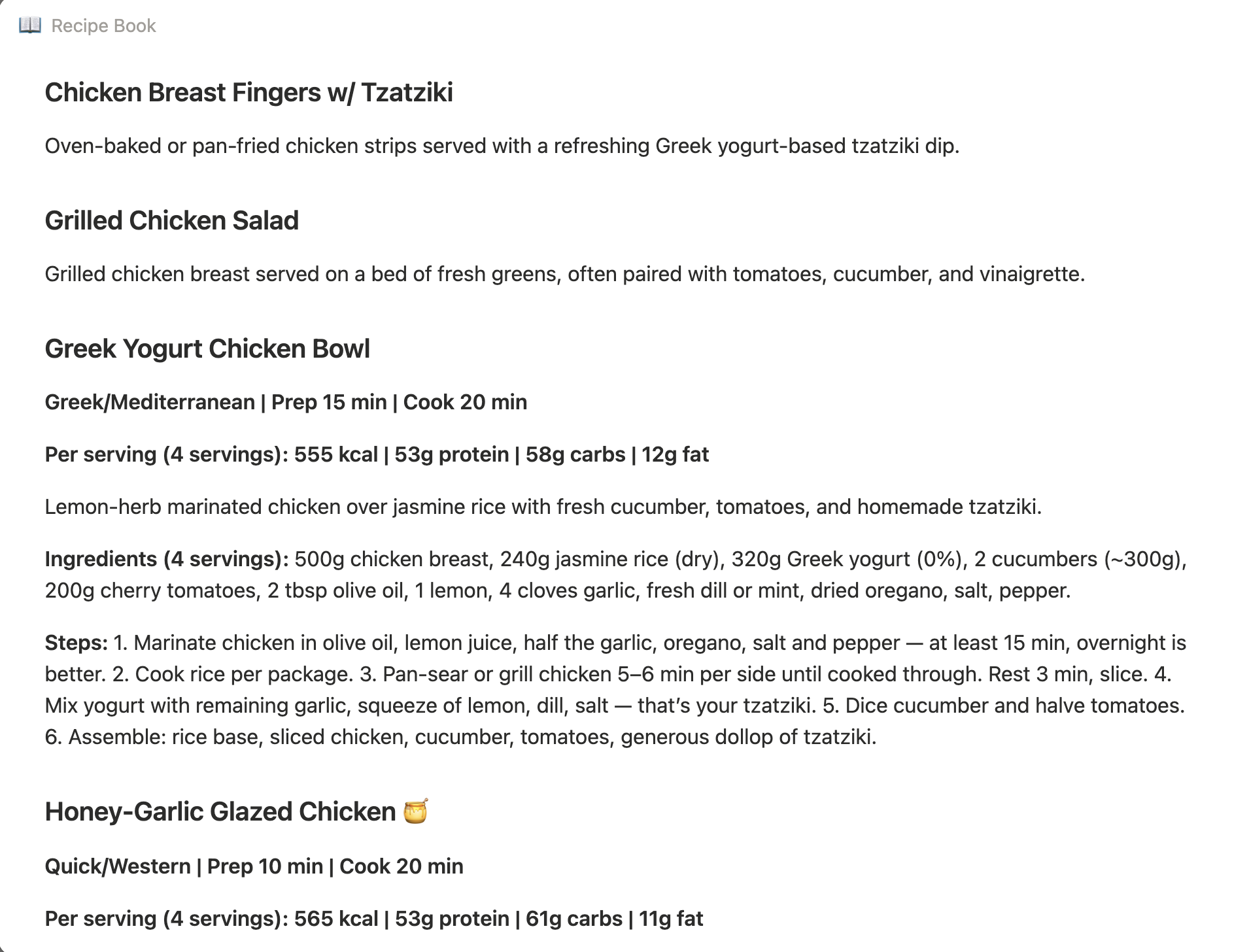
After a bit of iteration I was able to quickly fetch the intended Notion page. The idea was a standalone tool recipe_list to get the list of recipes with just a title and a short description and then a recipe_get for the entire body. Only issue is my recipe book is formatted inconsistently, yikes.
Side quest
Obviously this can’t be. The entire automation hinges on the simple fact that all data should be of the same format. /s
It is what it is. I over-engineered again and made an additional recipe_update tool. But with that all my tools are complete to finally create an “agent”. Should be a simple one, its main job is to take an incomplete recipe and fill in the missing details from the web.
Configuration
I created a new graph and landed on a single native agent. The first thing is configuring the model, so I drilled down to the default native agent and changed from gemma4:31b to qwen3.6:27b and also pointed it to my Ubuntu machine running my llama server. The model choice isn’t that big of a deal for this task, it can probably even be a smaller model.
To give the agent functionality, we can start by dragging a Tool Node, and selecting the recipe_list in the inspector. I would also need the recipe_get and recipe_update so I just copy pasted the existing tool node. All of these tools would need the NOTION_API_KEY so I dragged the Secret Node and fill it in with the var name (note, not the value!) from my secrets env.
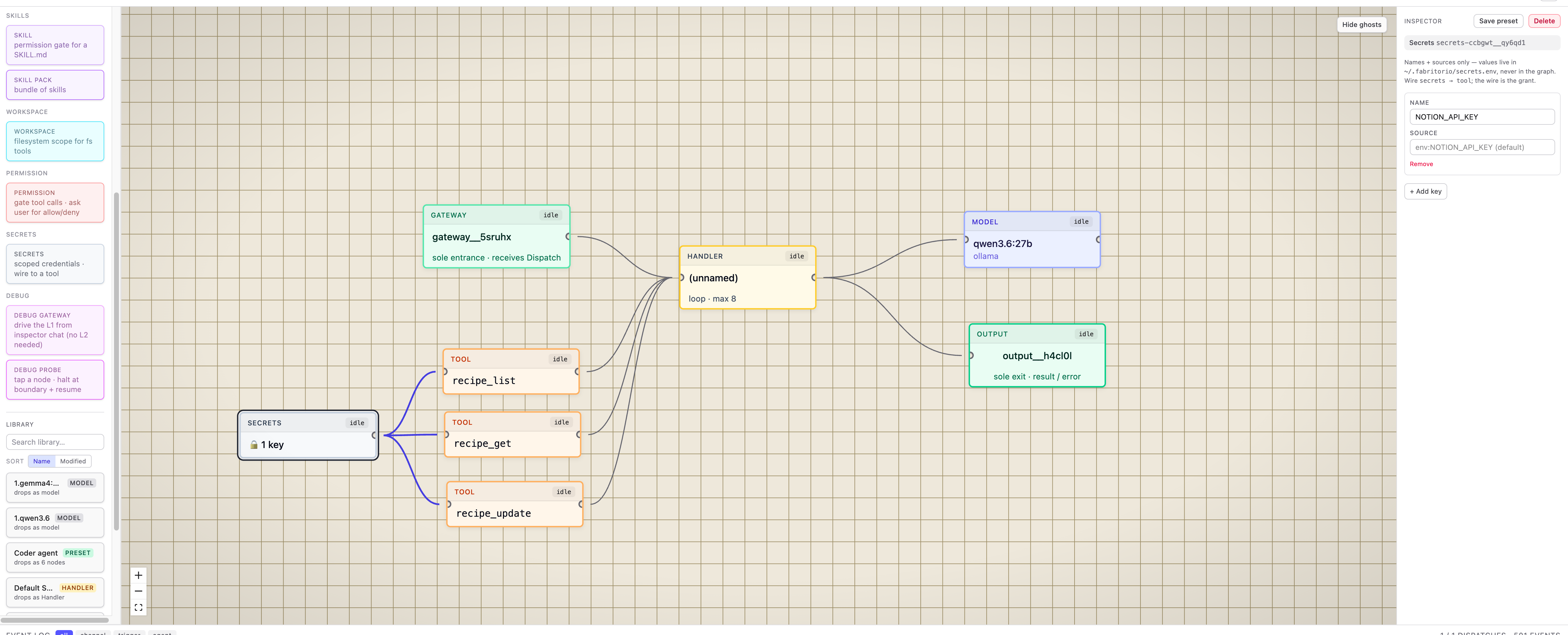
recipe_list, recipe_get, recipe_update — plus a Secret node for the Notion key, all wired into one native agent. Click to view full size.Quick test to see if both tools are accessible. Dragging the Debug gateway allows for ephemeral chatting with the agent. After confirming the secret is working, I then attached two additional tools, web_fetch and web_search, as well as a Secret Node for the Brave API key.
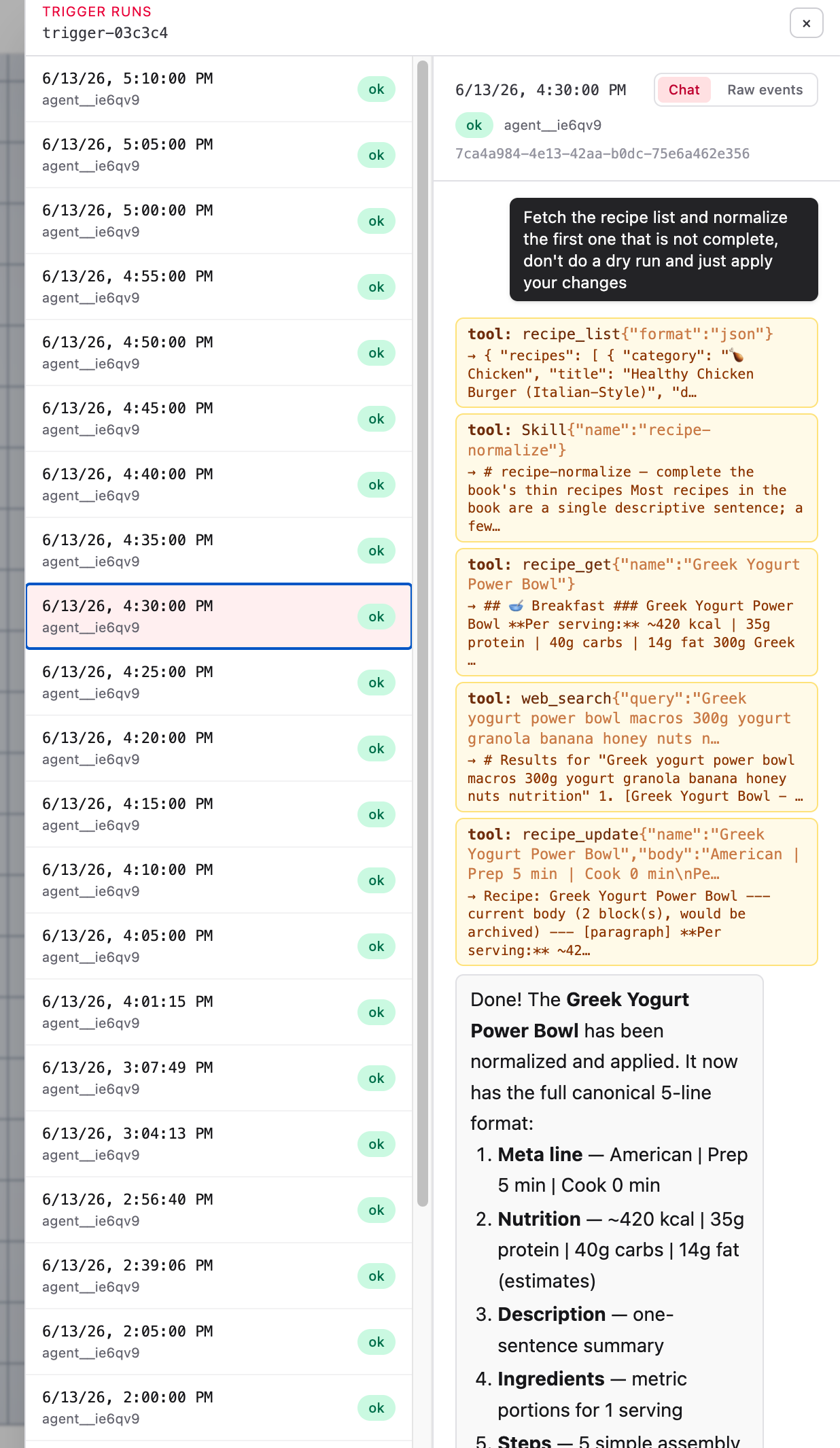
Lastly I created a small skill and made use of the Skill Node to teach the agent how to normalize a recipe. The gist is to use fetch and grab the “complete” metadata, then get the first one, and standardize into five-line format (timing, macros, description, metric ingredients, steps), one recipe at a time.
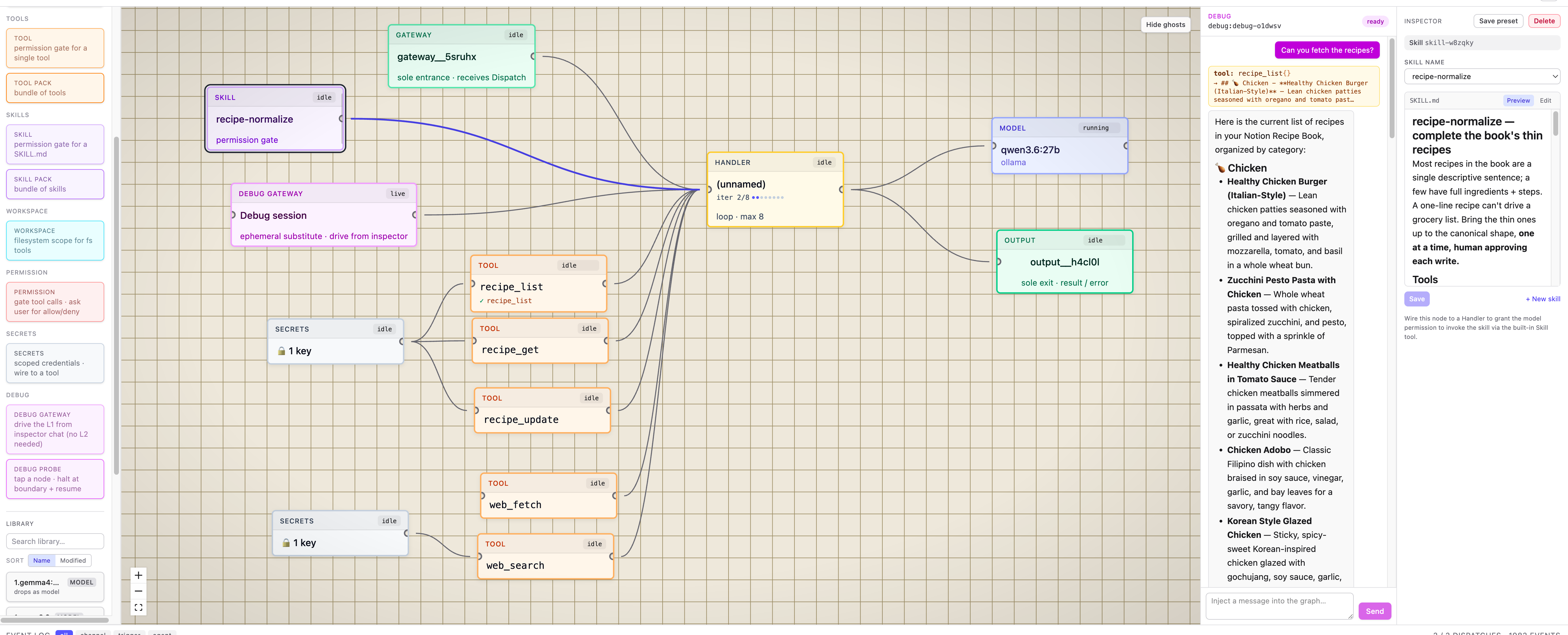
web_fetch + web_search (with a Brave-key Secret node), and a Skill node teaching the normalize step.Now to run this. What I did is simply attached a Trigger Node (Schedule) and set it to run every 5 min with the prompt:
Fetch the recipe list and normalize the first one that is not complete, don’t do a dry run and just apply your changes
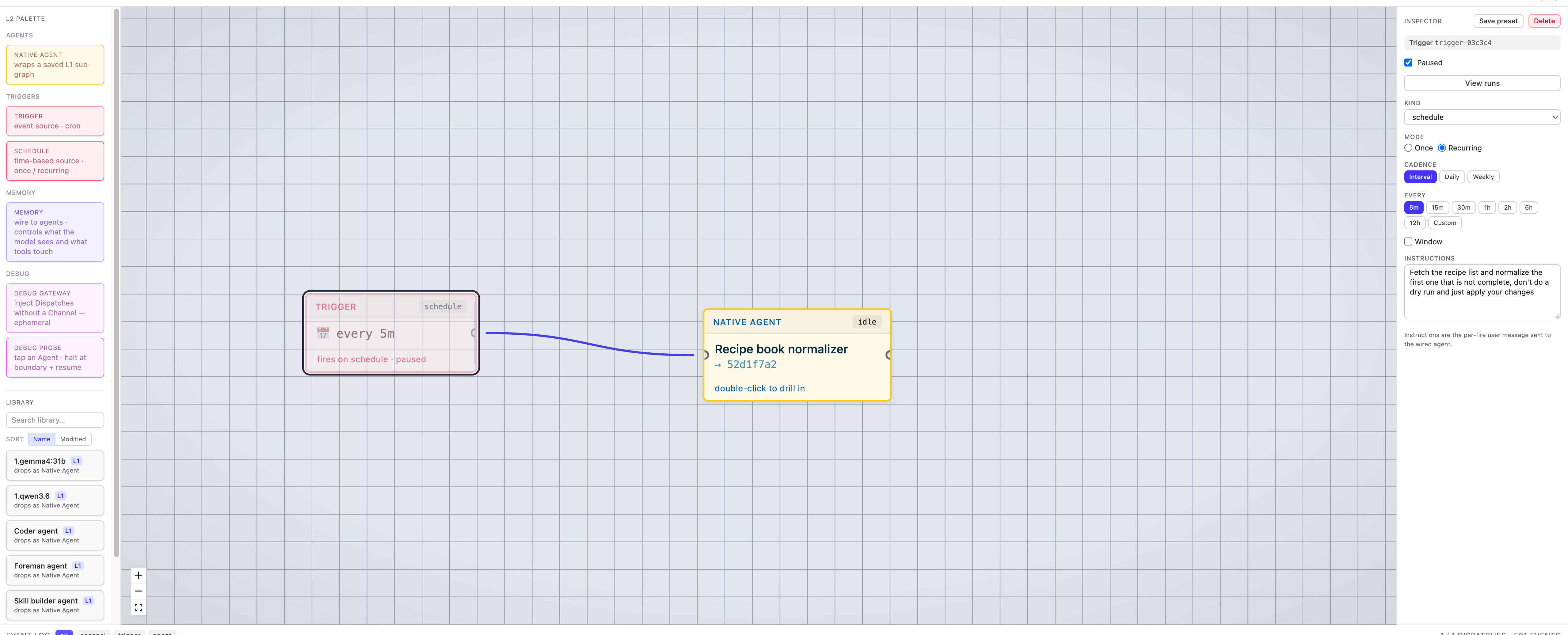
I let it rip and went about my day. And then voilà, recipes are now looking clean!
Uniform format is good format
Although I got sidetracked and didn’t accomplish the original goal of the full end meal planner agent, I think it was still a win to at least standardized the format of the recipe list. Of course I would still need to double check and verify the details to make sure it was the intended recipe before, but at least it would be easier to edit than to start from scratch. Dogfooding this automation actually led to the project’s very first PR. After realizing that most pages were blocking the web_fetch tool I sparred with Claude to improve it a bit, of course it still doesn’t pass JS challenge or even a TLS handshake check, but it’s low enough friction that it’s basically free to add.
Overall I enjoyed building this one, definitely liking how visual the project is. That and how “easy” it is to set up agents. The initial set up of building tools is still the friction but one step at a time.